 HappyHorse 1.1
HappyHorse
Alibaba's expressive motion model — HappyHorse shoots 3–15 second takes with native audio from text, images or references, and its built-in video edit rewrites footage you already have from one instruction. Generate below at limited-time pricing.
- Failed generations auto-refunded
- Credit packs never expire
- Every model's price is public
- Cancel anytime in one click
- 3–15 s
- Single take length
- Up to 1080P
- Two resolution tiers
- 9
- Aspect ratios, 21:9 to 9:21
- From 18 cr/s
- HappyHorse 1.1 720P limited-time rate
Six takes, six full prompts
An F1 onboard chase, a glass-tunnel night ride, a lip-synced news anchor, a claymation cat, a guitarist who speaks and a one-line recolor — every clip below was generated with HappyHorse and ships the complete prompt that made it. Hit Remix to load any prompt straight into the generator above and make it yours.
- HappyHorse 1.1
- Text to video
- 15s
- 1080P
[Style and Camera Setup] Ultra-photorealistic F1 onboard camera POV footage, mounted directly behind the driver's helmet on the roll hoop, identical to the official F1 onboard camera angle. The lower foreground of the frame captures the driver's helmet, the full nose and front wing of the car stretching ahead, with rival F1 cars clearly visible on track. Hyper-realistic physics simulation including authentic car vibration, chassis flex, suspension movement and aerodynamic buffeting. 8K cinematic quality, real broadcast color grading, motion blur on high-speed moving elements, tire smoke and rubber debris on track surface. [0-4 seconds] The car launches out of a high-speed corner at approximately 280km/h, the chassis shaking violently from kerb vibration as it exits the corner. Two rival F1 cars appear directly ahead, one slightly to the left and one slightly to the right, their rear diffusers and rear wings filling the frame. The driver's gloved hands make micro-corrections on the steering wheel, the car weaving slightly under braking instability. Engine roar is deafening, the entire frame vibrates with mechanical intensity. Tire squeal and downforce whistle fill the audio. Track surface details, paint marks and rubber racing lines are hyper-realistic. [4-9 seconds] The car approaches a tight chicane at full racing speed, heavy braking causes the nose to dip dramatically, the entire car shuddering under 5G deceleration force. The driver's helmet tilts forward under braking load. The car turns sharply left then immediately right through the chicane, the chassis rolling and yawing with authentic weight transfer, tires visibly deforming under lateral load. A rival car is overtaken aggressively on the inside of the corner, the two cars passing within centimeters of each other, slipstream turbulence causing the camera to shake violently. Tire smoke wisps from the front wheels under trail braking. [9-15 seconds] The car accelerates hard out of the final corner onto a long straight, the rear tires momentarily breaking traction causing a visible rear-end snap and oversteer, the driver catching the slide with a sharp opposite lock steering input. The car straightens and rockets down the straight at increasing speed, the two cars ahead growing smaller in the distance. Grandstand crowds on both sides blur past at extreme speed. The engine note rises through the rev range hitting the limiter, the driver upshifting via paddle shifts causing sharp torque interruptions. The camera shakes continuously with road surface imperfections and aerodynamic turbulence. The final frame shows the car at full speed with heat haze rising from the asphalt ahead. [Quality Enhancement] Authentic F1 onboard footage realism, real physics-based car movement, genuine suspension travel and chassis flex, accurate tire behavior under load, realistic engine and aerodynamic audio, cinematic motion blur on high-speed elements, broadcast-accurate color grading, hyper-realistic track surface with rubber marbles and tire marks, continuous realistic camera vibration throughout the entire clip, no artificial smoothing applied.
- HappyHorse 1.1
- Image to video
- 15s
- 720P
【0–3s】 The frame opens in first-person POV at the entrance of the glass tunnel — the motorcycle dashboard sits at the bottom of frame, the tachometer needle twitching from zero, the circular steel tunnel frame receding into infinite distance, the city nightscape flowing past the glass walls on both sides like rivers of light. The camera holds still. Waiting. 【3–7s】 Sudden acceleration — the cyan neon guide rails on both sides of the tunnel begin to streak backward in motion blur, forming hyper-speed light trails. The red motorcycle body catches dynamic reflections as it accelerates, the city skyscrapers outside the glass tunnel blazing past in lateral streaks, while the orange sunset horizon in the distance remains perfectly still — creating a powerful spatial tension against the forward velocity. The dashboard needle climbs rapidly. 【7–10s】 The camera creatively phases through the glass tunnel wall — the perspective instantly flips to the exterior of the tunnel, revealing this transparent pipe suspended high above the city, the red motorcycle moving through it like a bullet, a cyan light trail hundreds of meters long streaming behind the vehicle. The camera pursues in a spiraling dive. 【10–12s】 The final two seconds snap back to first-person POV — the tunnel exit light grows closer, larger, brighter, until it explodes to fill the entire frame in a blinding white cut. Only the fading echo of the engine remains in the silence. Grade: Cyber cyan × Blazing red × Sunset amber-gold. Extreme velocity aesthetics — motion blur and razor-sharp detail alternating in dynamic tension.
- HappyHorse 1.1
- Text to video
- 10s
- 1080P
Medium shot of a professional news anchor at a sleek desk in a modern broadcast studio, cool blue lighting, softly glowing screens behind. 0-5s: He looks into the camera and says in a clear measured voice, "Good evening. Tonight, a breakthrough that could change how millions of us work." 5-10s: He turns slightly toward a second camera, "We'll have the full story, and what it means for you, right after this." Precise lip-sync, subtle studio room tone, crisp broadcast quality, shallow depth of field.
- HappyHorse 1.1
- Text to video
- 12s
- 720P
Create a whimsical, cinematic claymation-style animation of a playful black-and-white cat transforming a grayscale world into a vibrant paradise. As the cat flips, runs, and lands, each step splashes rainbow paint and colorful confetti, bringing grass, flowers, rivers, trees, houses, mountains, and the sky to life. The camera follows with smooth dynamic movements, revealing a charming floating island filled with smiling celestial characters, lush vegetation, and colorful details. End with the cat proudly holding a red flower in a fully transformed, cheerful miniature world. Pixar-quality lighting, handcrafted clay textures, smooth animation, vibrant colors, and magical storytelling.
- HappyHorse 1.1
- Image to video
- 10s
- 1080P
character1 in a cozy dim room strums once, looks up and says in English: "This next one I wrote at three in the morning." Warm practical light, intimate, cinematic, precise lip-sync.
- HappyHorse Video Edit
- Video edit
- 8s
- 1080P
Recolor the scene using the reference image's style
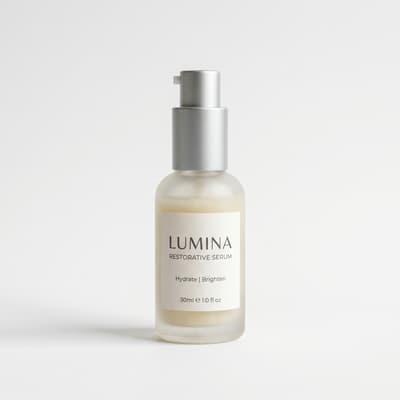
Five reference images, one finished commercial
Reference-to-video in one pass: a serum bottle, eucalyptus, jasmine, water droplets and a marble counter go in as five numbered stills, and the prompt arranges them into a scene — the way material mentions work in the Molyin generator. HappyHorse 1.1 reads them as one brief and delivers the finished spa spot.




The prompt
Arrange the skincare serum bottle on the marble surface surrounded by the eucalyptus leaves, white jasmine flowers, and glistening water droplets from the references, forming a fresh premium skincare product scene, with a slow gentle camera move and soft consistent spa lighting.
What Is HappyHorse?
HappyHorse is Alibaba's video generation model, built around one obsession: motion that looks like it was filmed, not assembled. The current 1.1 engine generates clips from a text prompt, animates a still image into video, or composes a scene from reference images — with the fluid camera work and physical coherence that made the model's name. The same model also edits: the video edit capability, introduced with version 1.0, takes a clip you already have and rewrites it from a plain-language instruction — swap the style, replace an object, keep everything else intact. On Molyin it runs as its own billing tier, listed as HappyHorse Video Edit in the model dropdown.
The spec sheet is unusually generous for a video model. Length is a continuous dial from 3 to 15 seconds — any integer, not a menu of presets — at 720p or 1080p. Nine aspect ratios cover every feed that matters, including 4:5, 5:4, and the ultra-tall 9:21 that most rivals simply don't offer. A seed control lets you reproduce and iterate on a result. Generation also comes with native audio that matches the scene — while video edits keep your source clip's original soundtrack.
On Molyin, HappyHorse runs inside the same AI video generator as the rest of our lineup — one prompt box, one credit balance. Editing has a dedicated home in the AI video editor. Credits work the same everywhere; the pricing page has the numbers.
HappyHorse vs Seedance 2.0
Both are live on Molyin, and they're genuinely complementary — one prompt box, one credit balance, so the honest answer to "which one?" is: run your prompt on both and keep the winner.
| Spec | HappyHorse | Seedance 2.0 |
|---|---|---|
| Duration | 3–15s, continuous | 4–15s, continuous |
| Resolution | 720p · 1080p | 480p · 720p · 1080p · 4K |
| Aspect ratios | 9 — adds 4:5, 5:4, and 9:21 | 6 |
| Audio | Native audio generation | Native audio generation |
| Price | 18 credits/s at 720p · 24 credits/s at 1080p (limited-time) | 12 / 28 / 66 / 136 credits/s by tier |
| Reaches its best in | Fluid motion, feed-native vertical formats, high-volume creation on a budget | Sound-on storytelling, 480p quick drafts, dialogue and ambience baked in |
Rates shown are current execution prices on Molyin; the HappyHorse 1.1 rate is a limited-time offer.
HappyHorse vs models live on Molyin
| Model | Positioning | Release Date | On Molyin |
|---|---|---|---|
| HappyHorse | Expressive generation + instruction video editing | Jun 2026 (1.1) | Live — generate above |
| Seedance 2.5 | ByteDance flagship — 30s takes, directed second by second | Aug 7, 2026 (API) | Live — generate above |
| FLUX 3 | Black Forest Labs — storyboard keyframes + take continuation | Aug 7, 2026 (video API) | Live — generate above |
| Wan 3.0 | Alibaba's All-in-One model, up to 30s takes | Aug 6, 2026 | Live — generate above |
| MiniMax H3 | Omni-modal flagship, native 2K + stereo | Jul 31, 2026 · open weights announced | Live — generate above |
| Seedance 2.0 family | Standard / Fast / Mini workhorses, up to 4K | Apr 2026 (API) | Live — generate above |
| Kling 3.0 | Element references + native audio, up to 4K | Feb 4, 2026 | Live — generate above |
| Veo 3.1 | Google's cinematic model with audio | Oct 2025 | Live — generate above |
One subscription, one credit balance — every model available above is included.
HappyHorse full specifications
| Parameter | Value | Notes |
|---|---|---|
| Model | HappyHorse — 1.1 generation engine · video edit from 1.0 | One model, two capabilities: generation and editing share the engine, billed as separate tiers on Molyin. |
| Generation modes | Text / Image / Reference to video | Three modes on HappyHorse 1.1; the Video Edit companion adds an instruction-based video edit mode. |
| Resolution tiers | 720P / 1080P | Both tiers on every mode — draft at 720P, finish at 1080P. |
| Clip length | 3–15 s | A continuous slider, not fixed presets — need exactly 7 seconds for an ad slot, dial in 7. |
| Aspect ratios | 16:9 · 9:16 · 4:3 · 3:4 · 4:5 · 5:4 · 21:9 · 9:21 · 1:1 | Nine ratios from widescreen 21:9 to ultra-tall 9:21 — including the 4:5 and 5:4 that most video models skip. |
| Reference images | Up to 9 | Reference-to-video composes a scene from stills — the skincare anatomy above wires five of them into one commercial. |
| Audio | Native audio — always on | Sound generates together with the picture and dialogue lip-syncs — the news anchor sample above is one pass. |
| Seed control | Supported | Fix the seed to reproduce a result, or vary it to explore takes on the same prompt. |
| Video Edit source clip | 3–15 s | Upload the clip you want rewritten — its length and aspect ratio carry into the output. |
| Video Edit reference images | Up to 5 | Style and object references steering the rewrite — the recolor sample above uses exactly one. |
| Video Edit output | Follows the source clip | Length and aspect ratio follow the source; the original soundtrack is kept. |
| Credits per second | 18–83 cr/s | From HappyHorse 1.1 at 720P to Video Edit at 1080P — full per-tier pricing in the table below; failed generations are refunded. |
Everything listed here is already supported on the site, and stays in sync with the model's latest official capabilities.
HappyHorse pricing on Molyin
Generation and video edit are billed per second as two tiers of the same model, from the same credit balance as everything else on Molyin. The numbers below are computed straight from our billing engine — the generation rate is a limited-time offer, and failed generations are refunded automatically.
| Model | Resolution | Credits/sec | 5s Video | 5s Video + 3s Reference |
|---|---|---|---|---|
| 720p | 18 | 90 credits | Reference images only | |
| 1080p | 24 | 120 credits | Reference images only | |
HappyHorse Video Edit | 720p | 47 | 235 credits | Billed by source video length |
| 1080p | 83 | 415 credits | Billed by source video length |
Subscription plans and one-time credit packs are compared side by side on the pricing page.
How to generate with HappyHorse
Three steps from idea to a finished take
Pick a model and a mode
Switch between HappyHorse 1.1 and Video Edit in the dropdown, and choose text-to-video, image-to-video or reference-to-video.
Write the prompt
One concrete subject plus one clear motion, then layer camera, light and style on top. Put dialogue in quotes for lip-synced delivery — exactly like the samples on this page.
Generate and export
Pick 720P or 1080P and any length from 3 to 15 seconds, preview in place, then download the original file.
The basic prompt formula
Every solid HappyHorse clip starts the same way: one concrete subject plus one clear motion, then layer camera, environment and style on top as needed. Straight from our full prompt guide — every add-on is optional.
[Subject] + [Motion] + optional [Camera] [Environment] [Style]
Subject
The star of the frame — a person, animal, or product. The more specific, the better.
Motion
What the subject does, with body parts and pace spelled out; slow, continuous small motions are the safest.
Camera
Framing and camera movement: close-up, push-in, dolly — one move per shot.
Environment
Setting and mood: place, time of day, lighting, weather.
Style
Art direction and image quality: color palette, texture, clarity.
HappyHorse FAQ
What creators ask about Alibaba's video model — answered from our own integration.
Start Creating with Molyin Today
Sign up free and turn your first idea into a cinematic video in minutes.