AI Image Editor
Upload a photo, type the change, get a new image. Molyin's AI image editor re-renders the picture you already have — replace what is in the frame, change the background, restyle the whole shot, or merge several references into one — with editing models from GPT Image 2, Nano Banana 2.1, Nano Banana Pro, Seedream 5.0, FLUX.2 and Grok Imagine 2.0.
- Failed generations auto-refunded
- Credit packs never expire
- Every model's price is public
- Cancel anytime in one click
- 11
- Editing models
- 16
- Reference images up to
- 4K
- Output up to
- 3
- Credits per edit from
Real Edits, Real Instructions
Two real edits, each paired with the exact instruction that made it — copy one and make your first successful edit.
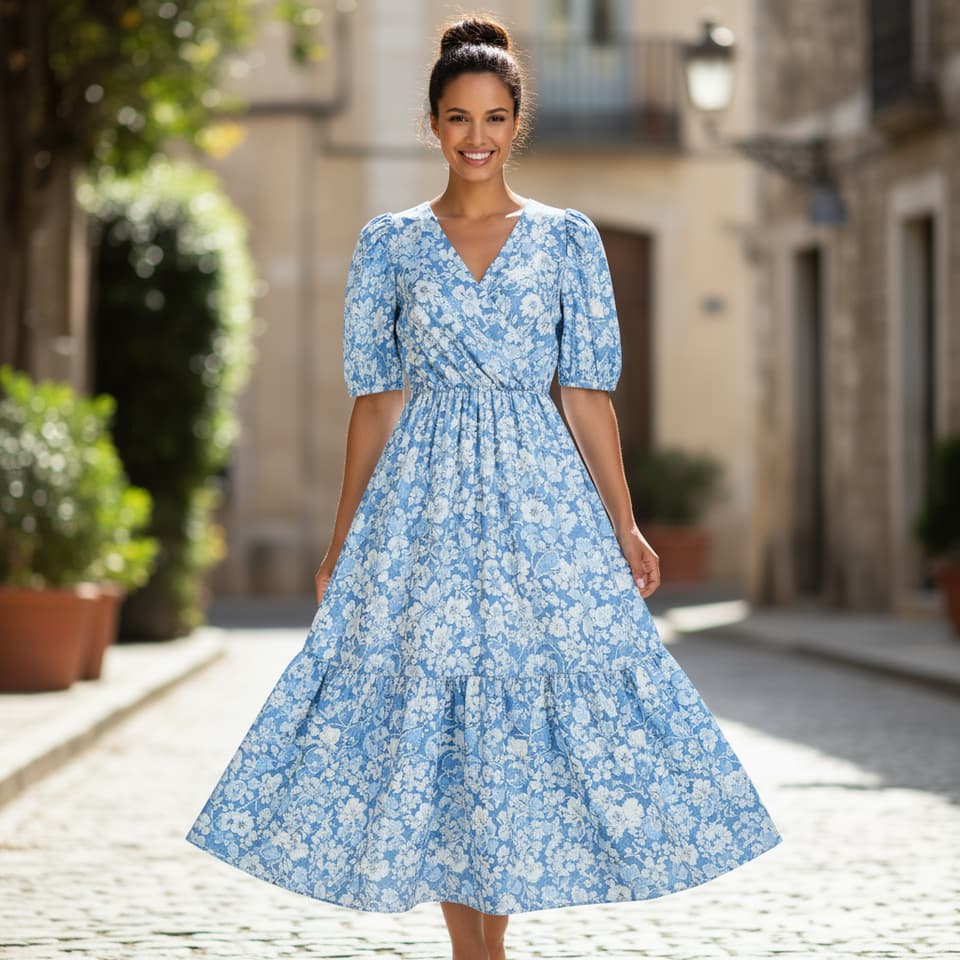
- Nano Banana 2.1
- Image to image
- 1:1
- 1K
Create a professional e-commerce fashion photo. Take the blue floral dress from the first image and let the woman from the second image wear it. Generate a realistic, full-body shot of the woman wearing the dress, with the lighting and shadows adjusted to match the outdoor environment.
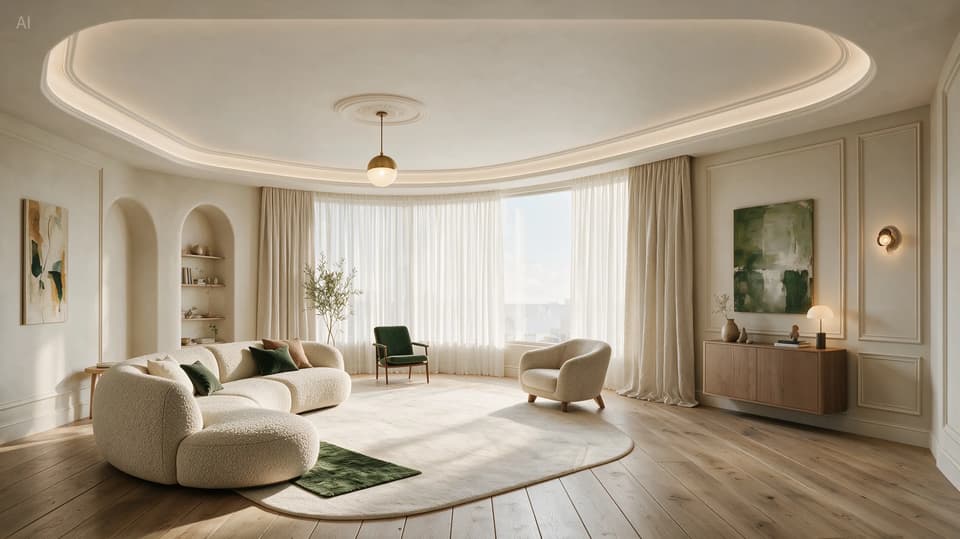
- Seedream 5.0 Pro
- Image to image
- 16:9
- 2K
Perform precise edits based on the 6 purple boxes and handwritten English annotations in the original image. The goal is to make the living room warmer, lighter, and more realistic.
What Is an AI Image Editor?
An AI image editor changes a finished picture from a written instruction instead of layers, masks and brushes. You upload the photo, describe what should be different, and an image-to-image model re-renders the frame to match — keeping the subject, composition and lighting you did not mention. The image-to-image glossary entry covers the term itself; this page is where you make an edit.
Molyin runs every leading image-editing model in one studio. GPT Image 2 takes up to 16 reference images and keeps text legible through the edit; Nano Banana 2.1 combines subjects from several references and outputs at up to 4K; Nano Banana Pro is built for product shots guided by multiple references; Seedream 5.0 Pro executes edits you mark directly on the image — boxes, arrows, handwritten notes; FLUX.2 adds custom width and height; Grok Imagine 2.0 is the fast option with up to five references. Because these models redraw the pixels rather than pasting a layer on top, the result looks photographed that way, not composited.
Editing and generating live in the same studio: when you need a brand-new picture rather than a changed one, the AI image generator creates it from a text prompt with the same credits, and for a plain cutout the background remover runs as a separate tool with a free daily allowance. Every edit bills per image, failed generations are refunded, and every paid plan on the pricing page includes commercial usage rights.
Which Model for Which Edit
Every image-editing model on Molyin, with the edits it is best at, how many references it takes, and what it outputs.
| Model | Best at | References | Output |
|---|---|---|---|
| GPT Image 2 | Edits that keep text legible; batches of up to 10 variations | Up to 16 | 1K / 2K / 4K, or exact pixel sizes up to 3840×2160 |
| Nano Banana 2 (2.1 / Lite) | Combining subjects from several references, ultra-wide reframes | Up to 10 | 1K / 2K / 4K (Lite: 1K) |
| Nano Banana Pro | Product shots guided by multiple references | Up to 8 | 1K / 2K / 4K |
| Seedream 5.0 (Pro / Lite) | Annotation-guided edits — mark up the image, the model follows the notes | Up to 10 | Pro 1K / 2K · Lite 2K / 3K / 4K |
| FLUX.2 (Dev / Pro / Max) | Reference-guided restyles with custom width and height | Up to 8 (Dev: 5) | 0.5K–4K presets or custom up to 2048 px (Dev: up to 1440 px) |
| Grok Imagine 2.0 | Fast edits that keep the input's aspect ratio | Up to 5 | Follows the input ratio, no resolution tiers |
The upload tile shows the exact reference limit for the model you select, and the credit estimate updates before you submit.
How to Edit a Photo with AI
Three steps from the original picture to the edited file — most edits finish in under a minute.
Upload Your Image
Drop in the photo you want to change, plus any references the edit needs — a product to place, a garment to wear, a style to match. The output keeps your image's framing unless you ask for a different ratio.
Describe the Edit
Write the change in plain language — "replace the sofa with the one in @Image2" or "make it golden hour" — and mention only what should change. Pick a model and resolution; the credit estimate updates before you submit.
Generate & Download
The model re-renders the image in seconds. Preview the result, download the file, or Remix with a tweaked instruction to try another take.
AI Image Editor vs. Layer-Based Editor
They solve different problems: one redraws the pixels from an instruction, the other gives you manual control over every layer.
| AI Image Editor (Molyin) | Layer-Based Editor | |
|---|---|---|
| Skill required | A sentence describing the change | Selections, masks, layers, blending, retouching |
| Time per edit | Seconds — the model re-renders in one pass | Minutes to hours of manual work per image |
| What it changes | The content itself: objects, backgrounds, styles, lighting, combined subjects | Whatever you can select and paint by hand |
| Best for | Swaps, restyles and composites where a description is enough | Pixel-precise retouching and print production |
The two are complements, not rivals — many creators re-render the hard part here, then finish the file in a layer-based editor.
Editing Credits, Per Image
Every editing model bills per output image at the resolution you pick, and failed generations are refunded automatically.
Priced by output resolution
| Model | Resolution | Credits/image |
|---|---|---|
| GPT Image 2 (Easy) | 1K | 8 |
| 2K | 13 | |
| 4K | 21 | |
| Nano Banana 2 Lite | 1K | 5 |
| Nano Banana 2.1 | 1K | 6 |
| 2K | 9 | |
| 4K | 13 | |
| Nano Banana Pro | 1K | 24 |
| 2K | 24 | |
| 4K | 32 | |
| Seedream 5.0 Lite | 2K | 8 |
| 3K | 8 | |
| 4K | 8 | |
| Seedream 5.0 Pro | 1K | 12 |
| 2K | 18 |
GPT Image 2 (Advanced) — priced by quality and output size
| Quality | ≤ 1024×1024 | ≤ 2048×1024 | ≤ 2048×2048 | > 2048×2048 |
|---|---|---|---|---|
| Low | 3 | 3 | 3 | 4 |
| Medium | 11 | 11 | 11 | 11 |
| High | 30 | 30 | 30 | 30 |
The auto quality tier bills at the high rate.
Priced by quality tier
| Model | Quality | Credits/image |
|---|---|---|
| GPT Image 2.5 (Flare) | Low | 4 |
| Medium | 14 | |
| High | 34 | |
| Extra high | 66 | |
| Max | 130 | |
| GPT Image 2.5 (Sunburst) | Low | 4 |
| Medium | 14 | |
| High | 34 | |
| Extra high | 66 | |
| Max | 130 |
Quality-tier models bill the same at every output size — pick any size up to 3840×2160 at the listed rate.
FLUX.2 — priced by output size
| Model | Output size | Credits/image | Reference images |
|---|---|---|---|
| FLUX.2 Dev | ≤ 1MP | 3 | +3 credits/MP |
| ≤ 1.5MP | 4 | ||
| ≤ 2.1MP | 6 | ||
| FLUX.2 Pro | ≤ 0.5MP | 5 | +4 credits/MP |
| ≤ 1MP | 7 | ||
| ≤ 2MP | 10 | ||
| ≤ 3MP | 14 | ||
| ≤ 4MP | 17 | ||
| ≤ 4.2MP | 18 | ||
| FLUX.2 Max | ≤ 0.5MP | 13 | +7 credits/MP |
| ≤ 1MP | 16 | ||
| ≤ 2MP | 23 | ||
| ≤ 3MP | 29 | ||
| ≤ 4MP | 36 | ||
| ≤ 4.2MP | 37 |
FLUX.2 reference images are billed by their real total pixel area — the reference column shows the surcharge per input megapixel.
Flat rate per image
| Model | Credits/image | Reference images |
|---|---|---|
| Grok Imagine 2.0 | 6 | +2 credits/image |
Flat-rate models bill the same for every output; on image-to-image runs, each reference image adds the surcharge shown above.
Subscription plans and one-time credit packs are compared side by side on the pricing page.
AI Image Editor FAQ
Everything about editing photos with AI on Molyin.
Start Creating with Molyin Today
Sign up free and turn your first idea into a cinematic video in minutes.